
During initial provisioning, certificate templates are imported automatically when Keyfactor Command is installed on Windows and the primary environment includes Microsoft CAs in the Active Directory forest An Active Directory forest (AD forest) is the top most logical container in an Active Directory configuration that contains domains, and objects such as users and computers. where Keyfactor Command is installed.
Templates from other environments or CA A certificate authority (CA) is an entity that issues digital certificates. Within Keyfactor Command, a CA may be a Microsoft CA or a Keyfactor gateway to a cloud-based or remote CA. types can be imported manually using the Import Templates option, as described below.
Locations → Certificate Templates
Supported Import Sources
Certificate templates can be imported from the following certificate authority A certificate authority (CA) is an entity that issues digital certificates. Within Keyfactor Command, a CA may be a Microsoft CA or a Keyfactor gateway to a cloud-based or remote CA. types.
-
EJBCA CAs
Templates can be imported after configuring a CA record for at least one EJBCA instance.
-
Microsoft CAs (trusted forests)
Templates can be imported at any time for Microsoft CAs in forests that have a two-way trust with the primary forest.
-
Microsoft CAs (untrusted or one-way forests)
Templates can be imported after configuring a CA record for at least one Microsoft CA in the external forest and turning on Use Explicit Credentials with appropriate credentials.
-
CA Connector
Templates can be imported after configuring a CA record for at least one CA accessed through the CA Connector
The Keyfactor CA Connector is installed in the customer environment to provide a connection between a CA and Keyfactor Command when a direct connection is not possible. It is supported on both Windows and Linux and has versions for Microsoft (Windows only) or EJBCA CAs. Client.
Automated Template Import
Templates associated with certificates issued by configured CAs appear automatically in the templates grid as certificates are synchronized to Keyfactor Command. Templates may also appear independently through the hourly automated template A certificate template defines the policies and rules that a CA uses when a request for a certificate is received. import process, even if no certificates have yet been synchronized.
The hourly automated template import runs only for CAs that have an active CA synchronization job configured.
Re-importing Templates
Templates must be re-imported if you add a new template or change the name or key size The key size or key length is the number of bits in a key used by a cryptographic algorithm. of an existing template and do not want to wait for the automated import process. For more information, see Import Templates.
Template Requirements for Enrollment
To support PFX A PFX file (personal information exchange format), also known as a PKCS #12 archive, is a single, password-protected certificate archive that contains both the public and matching private key and, optionally, the certificate chain. It is a common format for Windows servers. and CSR A CSR or certificate signing request is a block of encoded text that is submitted to a CA when enrolling for a certificate. When you generate a CSR within Keyfactor Command, the matching private key for it is stored in Keyfactor Command in encrypted format and will be married with the certificate once returned from the CA. enrollment Certificate enrollment refers to the process by which a user requests a digital certificate. The user must submit the request to a certificate authority (CA)., certificate templates need to be configured with enrollment patterns (see Add or Modify an Enrollment Pattern) and the certificate authorities that will issue the certificates need to be enabled for enrollment (see HTTPS CAs Advanced Tab or DCOM CAs Advanced Tab).
Certificate Template Management
In Keyfactor Command, certificate templates are typically imported from their source certificate authority rather than created directly within the platform. However, for certain CA types—such as EJBCA instances managed directly or through a CA connector—templates can also be created and managed from within Keyfactor Command.
Depending on the CA type and environment, templates can be imported, viewed, modified, and, where supported, created to support enrollment and certificate management workflows.
From the Certificate Templates page, you can import templates, configure Keyfactor Command-specific template settings, view template details, and—where supported—create or manage templates directly on the CA.
The following sections describe the available certificate template actions.
Searching Certificate Templates
This page supports the standard query format described in Using Search in the Management Portal and includes its own set of query parsers specific to this operation. Use the following parsers to filter and refine results for this page.
-
DisplayName
Complete or partial matches with the name of the template Display Name.
-
Complete or partial matches with the forest location.
Note: This search term has been deprecated and may be removed in a future release. -
FriendlyName
Complete or partial matches with the Keyfactor Command friendly name of the template.
-
Private Key
Private keys are used in cryptography (symmetric and asymmetric) to encrypt or sign content. In asymmetric cryptography, they are used together in a key pair with a public key. The private or secret key is retained by the key's creator, making it highly secure. Retention is selected for this template (true/false). -
Id
Numeric matches with the Keyfactor Command reference ID for the template.
-
IsDefaultTemplate
The template is one of the Microsoft default templates (true/false). This is helpful to filter in or out any Microsoft built-in templates that you didn't create.
-
ShortName
Complete or partial matches with the template Short Name.
Import Templates
Templates need to be imported manually when using an EJBCA CA, a Microsoft CA in a different forest, or when running Keyfactor Command on a non-domain-joined server. Manual import is also required if you have added or modified a template on the CA—for example, by changing its name or key size—without waiting for or configuring the automated import process (see Automated Template Import). Templates are imported automatically only when Keyfactor Command is connected to a Microsoft CA on a domain-joined server in the same forest.
To import certificate templates:
- On the Certificate Templates page, choose Import Templates from the toolbar.
-
In the Select Configuration Tenant dialog, select a configuration tenant in the dropdown.
Tip: Previous versions of Keyfactor Command referred to the Configuration Tenant as the Template Forest.Import once for each configuration tenant containing templates that you want to import. The import process may take several seconds.
- Short Name: <end entity profile name>_<certificate profile name>
- Display Name: <end entity profile name> (<certificate profile name>)
If the end entity profile name and certificate profile name are the same, only the end entity profile name is used.
For example, if both names are Development Web Server, the Short Name and Display Name will both be Development Web Server.
Only certificate profiles configured as available in a given end entity profile will be imported as templates associated with the given end entity profile name.
Out of the box, for Windows installations under IIS, template import is supported automatically only for Microsoft CAs in the same forest as the Keyfactor Command server, as well as any Microsoft CAs in forests that have a two-way trust with this forest.
To import templates from Microsoft CAs outside of these forests, configure the Use Explicit Credentials option for each CA you want to include. Enter credentials that have sufficient permissions to query the CA for template records (see Authentication Method Tab). Only one CA in each forest needs to be configured for the template import to function.
Edit
The options configured in templates largely relate to how certificates issued with them are managed in Keyfactor Command and how certificates are issued through Keyfactor Command if an enrollment pattern is not specified for the enrollment.
To configure template options:
- To edit a template, double-click a template in the grid or select the template and choose Edit from the toolbar or right-click menu.
-
When the template opens for editing, you will see two tabs. Follow the instructions for each tab provided below to enter the necessary data.
At the top of the page above the tabs you will see up to four buttons:
-
Back: Return to the main certificate templates page without saving changes
-
Save: Save the changes to the template record
-
View on CA: View the details for this template as configured on the CA (see View on CA). This button appears only for some templates.
-
Copy on CA: Create a copy of this template as configured on the CA (see Copy on CA). This button appears only for some templates.
Details Tab
Details
The information in the Details section is for reference and cannot be edited. This includes:
-
Template Short Name: The common name
A common name (CN) is the component of a distinguished name (DN) that represents the primary name of the object. The value varies depending on the type of object. For a user object, this would be the user's name (for example CN=John Smith). For SSL certificates, the CN is typically the fully qualified domain name (FQDN) of the host where the SSL certificate will reside (for example servername.keyexample.com or www.keyexample.com). of the template. This name typically does not contain spaces. -
Template Display Name: The display name of the template.
-
OID: For a Microsoft certificate template, the object ID of the template retrieved from Active Directory. For an EJBCA certificate template, this field is generated within Keyfactor Command as an object identifier
Object identifiers or OIDs are a standardized system for identifying any object, concept, or "thing" with a globally unambiguous persistent name., but does not follow official OID Object identifiers or OIDs are a standardized system for identifying any object, concept, or "thing" with a globally unambiguous persistent name. conventions.
Key Types and Sizes
The information in the Key Types and Sizes section reflects the primary key sizes and types supported by the template at the CA level. It is for reference and cannot be edited. This includes:
- RSA Key Sizes: The supported key sizes for the template.
- ECC Curves: The elliptic curve algorithms defined for the certificate template.
- Supports Ed448: Whether the template supports the Ed448 A high-security elliptic curve algorithm, Ed448 is used for digital signatures and is known for providing very strong security while maintaining high performance. It is part of the Edwards-curve Digital Signature Algorithm (EdDSA) family. algorithm (Yes/No).
- Supports Ed25519: Whether the template supports the Ed25519 A member of the EdDSA family, Ed25519 is designed for high security and speed. It is widely used in modern cryptography and provides robust protection with a 256-bit key size. algorithm (Yes/No).
- Supported ML-DSA Algorithms: A list of the supported ML-DSA algorithms.
- Supported SLH-DSA Algorithms: A list of the supported SLH-DSA algorithms.
-
Extended Key Usages: A list of EKUs such as Client Authentication, Server Authentication, etc.
Alternative Key Types
The information in the Alternative Key Types section reflects the alternative key types supported by the template at the CA level. It is for reference and cannot be edited. This includes:
- Supported ML-DSA Algorithms: A list of the supported ML-DSA algorithms.
- Supported SLH-DSA Algorithms: A list of the supported SLH-DSA algorithms.
Friendly Name
In the Friendly Name section, enter a Friendly Name, if desired. Template friendly names, if configured, appear in template selection dropdowns in place of the template short names. This can be useful in environments where the template short names are long or not very human readable. This setting is not required.
Enrollment
Enable the Allow One-Click Renewals option, if desired. To use One-Click Renewal for certificates, the Allow One-Click Renewals option must be turned on in both the certificate templates and CAs to which you want one-click renewal to apply (see
Private Key Retention
In the Private Key Retention section, turn on Private Key Retention, if desired, and select the
retention type in the dropdown. Enter the number of days, weeks, months, or years to keep the encrypted private key stored in the Keyfactor Command database based on the type selected, then select the desired time frame. The options are: Day(s), Week(s), Month(s), or Year(s). You will not have the option to choose a retention period if you choose Indefinite.Note: If private key retention is set at both the CA level and the template level, the configuration from the template is used.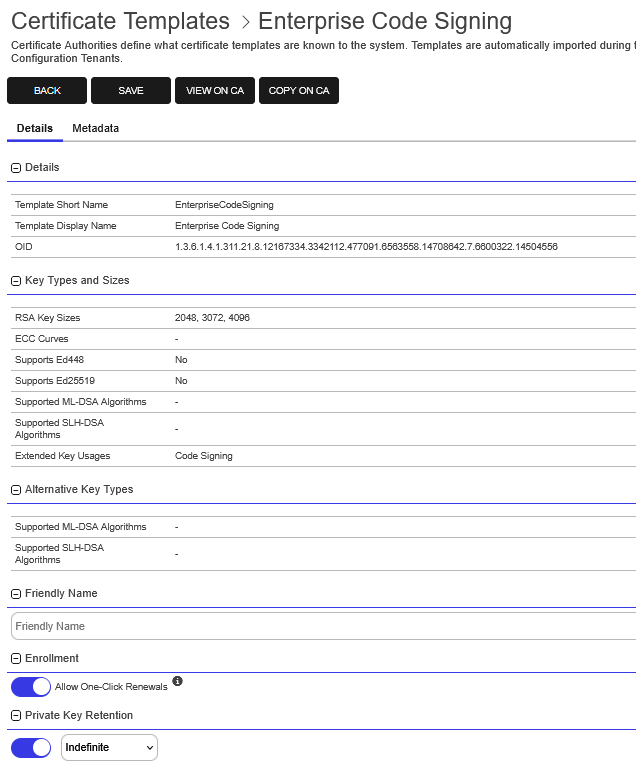
Figure 290: Certificate Template: Details Tab Part 1
Certificate Retention
When turned on, the Ephemeral setting causes certificates for the template to be skipped during a CA synchronization. The setting applies only to direct CA syncing and CA Connector Client syncing in version 26.2 and later. It does not affect enrollment. The default is off.
Important: Certificates enrolled through Keyfactor Command by using an ephemeral template are still issued, delivered, and saved to the Keyfactor Command database. The Ephemeral setting affects only certificates discovered during CA synchronization.Note: Templates should be set to Ephemeral before CA synchronization is turned on. Only templates set as Ephemeral at the start of a synchronization job will cause certificates to be skipped. If a template is set as ephemeral after CA synchronization is turned on, the certificates will not be skipped. See Configure CA Certificate Synchronization.Note: Certificate Requests (for example, external validation and pending requests) ignore the ephemeral template setting, so those certificates will be synchronized.Tip: The CA Connector Client (versions prior to 26.2) and Keyfactor Universal Orchestrator The Keyfactor Universal Orchestrator, one of Keyfactor's suite of orchestrators, is used to interact with servers and devices for certificate management, run SSL discovery and management tasks, and manage synchronization of certificate authorities in remote forests. With the addition of custom extensions, it can provide certificate management capabilities on a variety of platforms and devices (for example Amazon Web Services (AWS) resources, Citrix\NetScaler devices, F5 devices, IIS stores, JKS keystores, PEM stores, and PKCS #12 stores) and execute tasks outside the standard list of certificate management functions. It runs on either Windows or Linux servers or Linux containers. will not skip certificates for ephemeral templates during a CA synchronization. However these certificates will be filtered out before they reach Keyfactor Command and will not be added to the Keyfactor Command database. Logs:The timer service logs for Microsoft CA, EJBCA CAs and CA Connector (v26.2+), if set to TRACE, will show which certificates are being skipping during a synchronization including the template OID and common name and the certificate ID. The total number of certificates skipped will be shown at the end of the logs.
For those certificates belonging to an ephemeral template coming into Keyfactor Command from the Keyfactor Universal Orchestrator
Keyfactor orchestrators perform a variety of functions, including managing certificate stores and SSH key stores., although they will not be skipped on the synchronization, the Universal Orchestrator API An API is a set of functions to allow creation of applications. Keyfactor offers the Keyfactor API, which allows third-party software to integrate with the advanced certificate enrollment and management features of Keyfactor Command. log, if set to TRACE, will show which certificates were not imported into the Keyfactor Command database with the template ID, common name and OID. For pre-v26.2 CA Connector Client, the timer service log, if set to TRACE , will show the same information.
Important: Existing records are not removed. Configure certificate cleanup to remove existing records (see Certificate Cleanup Enabled).Displays the system-wide setting for certificate cleanup. Choose to Override System-Wide Setting if desired.
In the certificate cleanup section, configure the following options, if desired:
-
Certificate Cleanup Enabled for
-
Time After Expiration: The amount of time after expiration to wait until the certificate is eligible for removal. The default is 24.
-
Time After Expiration Units: The time unit to apply to the expiration time. Options are days, weeks, or months. The default is months.
-
Include Certificates with Archived Keys in Cleanup: Determines whether certificates with a private key stored in the system are eligible for removal. The default is off.
Important: If a certificate with a stored private key is deleted and later restored, the stored private key will not be restored.The certificate cleanup task runs daily at 1:00 UTC and removes expired certificates from the database. Once removed, these certificates are not re-imported during a standard CA synchronization unless certificate cleanup is later turned off. CA synchronization tasks use the certificate cleanup settings to determine whether a certificate is eligible for cleanup and whether to exclude such certificates from import.
For more information, see Certificate Cleanup.
Certificate cleanup settings can be configured at three levels:
-
Certificate Template Record: If configured, overrides the system-wide settings when processing certificate cleanup tasks for certificates associated with this template. These cleanup tasks are processed first.
-
Certificate Authority (CA) Record: If configured, overrides the system-wide settings when processing certificate cleanup tasks for certificates associated with this CA but not associated with any template. These cleanup tasks are processed second.
-
System-Wide: Applies to all certificate authorities and templates in the system. These values are used when processing certificate cleanup tasks for certificates associated with neither a CA nor a template and when no overrides are set at the CA or template level. These cleanup tasks are processed last.
Note: For manually imported certificates that do not have an associated template (for example, certificates issued by a standalone CA), system-wide cleanup settings are applied, even if the issuing CA is defined in Keyfactor Command.Because these certificates are imported without reliable issuer-to-CA mapping information, Keyfactor Command cannot consistently associate them with a specific configured CA. As a result, CA-level cleanup settings are not evaluated for those certificates.
Note: The system-wide settings for certificate cleanup are configured in application settings (see Application Settings: Console Tab).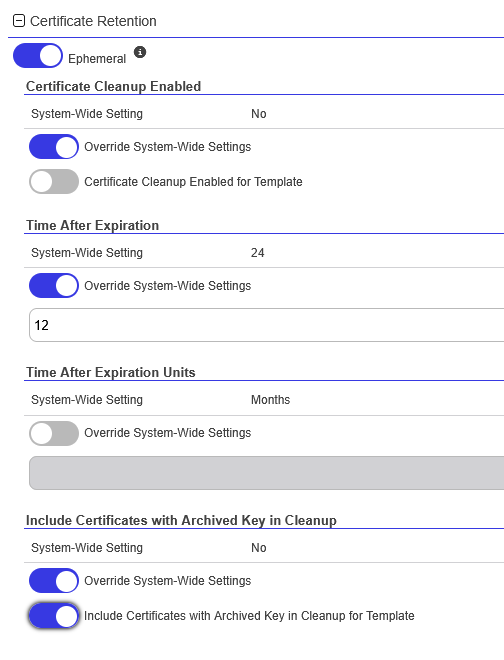
Figure 291: Certificate Template: Details Tab Part 2 - Certificate Retention Settings
Metadata Tab
Select metadata
Metadata provides information about a piece of data. It is used to summarize basic information about data, which can make working with the data easier. In Keyfactor Command, the certificate metadata feature allows you to create custom metadata fields that allow you to tag certificates with tracking information about certificates. fields can be configured at three levels:-
System-wide
-
Template level
-
Enrollment pattern level
The multi-level configurable fields are:
-
Enrollment Handling: Specifies whether the field is Optional, Required, or Hidden during enrollment.
Tip: Administrators can control which metadata fields appear at the global, template, or enrollment pattern level. For example, setting fields A and B as Required or Optional and field C as Hidden on the Primary WebServer enrollment pattern ensures only fields A and B appear during enrollment for that pattern. Meanwhile, field C can be set as Required for a different enrollment pattern, allowing it to appear only when that pattern is used. -
Default Value: A predefined value that populates during enrollment, which users can override.
-
RegEx Message: An error message displayed when the value entered in a string metadata field does not match the configured regular expression
A regular expression--RegEx--is a pattern used to validate data by ensuring it meets specific criteria. Several fields on the CSR enrollment, CSR generation, and PFX enrollment pages support RegEx validation, including certificate subject and metadata fields.. -
RegEx Validation: An optional regular expression that validates input for string metadata fields during enrollment.
-
Case-Sensitive Validation: Enforce case-sensitive validation for regular expression checks, overriding any case-sensitivity defined in the regular expression itself.
Note: The order of precedence for evaluating metadata settings during enrollment is as follows:Enrollment Pattern:
The enrollment pattern is evaluated first. If a value is set for the metadata field and setting (for example, enrollment handling), that value is used, and any configuration for the same metadata field and setting at the template and system-wide levels is ignored.
Template:
If the enrollment pattern does not have a value set for the metadata field and setting, the template is evaluated. If the template has a value set, that value is used, and any configuration at the system-wide level is ignored.
System-Wide Settings:
If neither the enrollment pattern nor the template has a value set for the metadata field and setting, the system-wide settings are evaluated. Values configured at this level are used if set.
Once the system-wide metadata has been defined, settings at the template level can be configured.
To configure metadata fields for a template:
- On the Metadata tab, double-click a row in the grid or select a row and choose Edit from the toolbar.
- In the Metadata dialog in the System-Wide Settings section, review the existing system-wide settings for the metadata field.
- In the Template Settings section, turn on Override System-Wide Settings. Configure the settings for the metadata field. The available fields will vary depending on the type of the metadata field.
Choose the enrollment handling for this template:
Optional: The metadata field will appear during enrollment with this template, but it will not be required to complete enrollment.
Required: This field will be required in order to complete enrollment with this template.
Hidden: This field will not be displayed during enrollment with this template.
- Set the Default Value if desired. If no default value is desired, the field may be left blank. For Multiple Choice type metadata fields, this field will appear as a dropdown where you can select from the existing values configured for the metadata field.
- If desired, set a RegEx Message and RegEx Validation string specific to the template used to validate the value upon enrollment, and any error message to display if the entry does not match the regex A regular expression--RegEx--is a pattern used to validate data by ensuring it meets specific criteria. Several fields on the CSR enrollment, CSR generation, and PFX enrollment pages support RegEx validation, including certificate subject and metadata fields. definition. For more information, see Adding or Modifying a Metadata Field. This option appears for string type metadata fields.
- If desired, set the Case-Sensitive Validation option to a different value than is set at the system or enrollment pattern level for this metadata field. This option only becomes active once the RegEx fields are populated. This option appears for string type metadata fields.
- Click Save on the Metadata dialog to save changes for each metadata field.
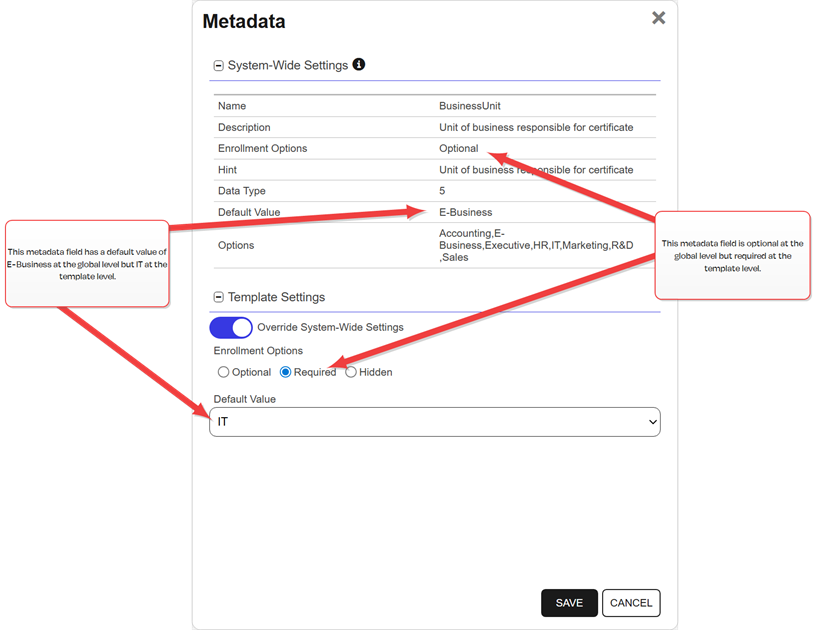
Figure 292: Template: Metadata Tab
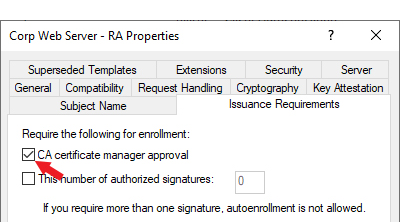
Tip: Templates that are configured for CA-level key archiving are not supported for enrollment done through Keyfactor Command. For a Microsoft CA, this is the Archive subject's encryption private key setting on the template. For an EJBCA CA, this is the Key Recoverable setting on the end entity profile, which only appears if key recovery has been enabled in system configuration. An error similar to the following on enrollment is an indication that a Microsoft template is configured to archive the private key:The request is missing a required private key for archival by the server.For enrollments done through Keyfactor Command, use Keyfactor Command private key retention (see Details Tab).
-
Create or Edit on CA
When you create a template in Keyfactor Command, the system automatically creates a corresponding certificate profile and end entity profile—both named after the template—in the associated EJBCA instance for the specified configuration tenant.
At least one CA from that EJBCA instance must be configured in Keyfactor Command before these options can be used. Templates cannot be created and linked to an existing end entity profile.
New templates are synchronized to the EJBCA instance immediately upon being saved.
To create a new template on the CA or edit an existing one:
-
On the Certificate Templates page, choose Add from the toolbar to create a new template on the CA, or select an existing template on the CA and choose Edit from the toolbar or right-click menu.
Important: The Edit on CA option is available only when a template’s certificate profile and end entity profile have a one-to-one mapping—that is, when the certificate profile is linked to exactly one end entity profile and vice versa. -
In the Select Configuration Tenant dialog, choose the configuration tenant for the EJBCA instance where you want to create the template.
Only configuration tenants for EJBCA instances accessed directly from Keyfactor Command are shown. Tenants for Microsoft CAs or EJBCA instances accessed through a gateway or CA connector are not included. The list is not limited by EJBCA version.
-
On the Create on CA page, enter the following information and then click Save:
-
Name: A name for the template, which is used in EJBCA as both the certificate profile name and the end entity profile name.
-
Available CAs: In the dropdown, select one or more CAs—or check Select All. The selected CAs will be configured in the certificate profile and end entity profile as Available CAs.
-
Validity Period: Enter the validity period for certificates issued with this template.
-
Key Usage: In the dropdown, select one or more key usage values for certificates issued with this template.
-
Extended Key Usage: In the dropdown, select one or more extended key usage (EKU) values for certificates issued with this template. Use the filter to display only items whose names contain the typed text. The filter is case-sensitive.
Note: Only EKUs supported by Keyfactor Command (see Extended Key Usages) can be applied to templates for an EJBCA CA. Templates that include EKUs defined directly in EJBCA but not supported by Keyfactor Command can be viewed in Keyfactor Command, but they cannot be edited or saved. -
Certificate Policies: To add a certificate policy, click Add, and in the Certificate Policies dialog, enter the following information:
-
Policy Id: Specifies the unique Object Identifier (OID) that identifies the certificate policy. The OID links the certificate to a specific policy definition in your organization’s Certification Practice Statement (CPS) or internal PKI
A public key infrastructure (PKI) is a set of roles, policies, and procedures needed to create, manage, distribute, use, store and revoke digital certificates and manage public-key encryption. policy framework. -
Type: Defines the type of information associated with the policy. The dropdown options are No Policy Qualifier (no additional data), User Notice Text (a short human-readable message), or CPS URI (a link to the applicable policy document).
-
Value: Specifies the content for the selected type. Enter the URI when the type is CPS URI, or the explanatory text or disclaimer when the type is User Notice Text. Leave this field empty when the type is No Policy Qualifier.
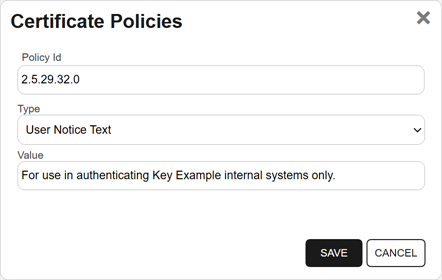
Figure 293: Add Certificate Policy During Create on CA
-
-
Custom Extensions: If any custom certificate extensions have been defined in your EJBCA instance, they will be available in this dropdown to be associated with the new template. Use the filter to display only items whose names contain the typed text. The filter is case-sensitive. See also View Extensions.
Tip: If two or must custom certificate extensions are configured in your EJBCA instance with the same name, only one of these will be displayed. Update the extension in EJBCA to give it a unique name to allow all extensions to appear in Keyfactor Command.Note: When retrieving custom extensions, Keyfactor Command assumes that each configuration tenant and host name The unique identifier that serves as name of a computer. It is sometimes presented as a fully qualified domain name (for example servername.keyexample.com) and sometimes just as a short name (for example servername). combination (for example, https://ejbca.keyexample.com) is unique. If a configuration tenant in Keyfactor Command is associated with more than one host name, extensions are retrieved from the first host name found for the specified configuration tenant. - RSA Key Sizes: In the dropdown, select any RSA A widely used public-key cryptosystem, RSA is commonly used for encryption and digital signatures. It is based on the mathematical difficulty of factoring large integers. key sizes to associate with the template.
- ECC Curves: In the dropdown, select any ECC Elliptical curve cryptography (ECC) is a public key encryption technique based on elliptic curve theory that can be used to create faster, smaller, and more efficient cryptographic keys. ECC generates keys through the properties of the elliptic curve equation instead of the traditional method of generation as the product of very large prime numbers. curves to associate with the template.
- Ed25519: Enable this option for the template, if desired.
- Ed448: Enable this option for the template, if desired.
- ML-DSA Algorithms: In the dropdown, select any ML-DSA algorithms to associate with the template.
- SLH-DSA Algorithms: In the dropdown, select any SLH-DSA algorithms to associate with the template.
- Alternative ML-DSA Algorithms: In the dropdown, select any ML-DSA algorithms to associate with the template as alternative keys.
- Alternative SLH-DSA Algorithms: In the dropdown, select any SLH-DSA algorithms to associate with the template as alternative keys.
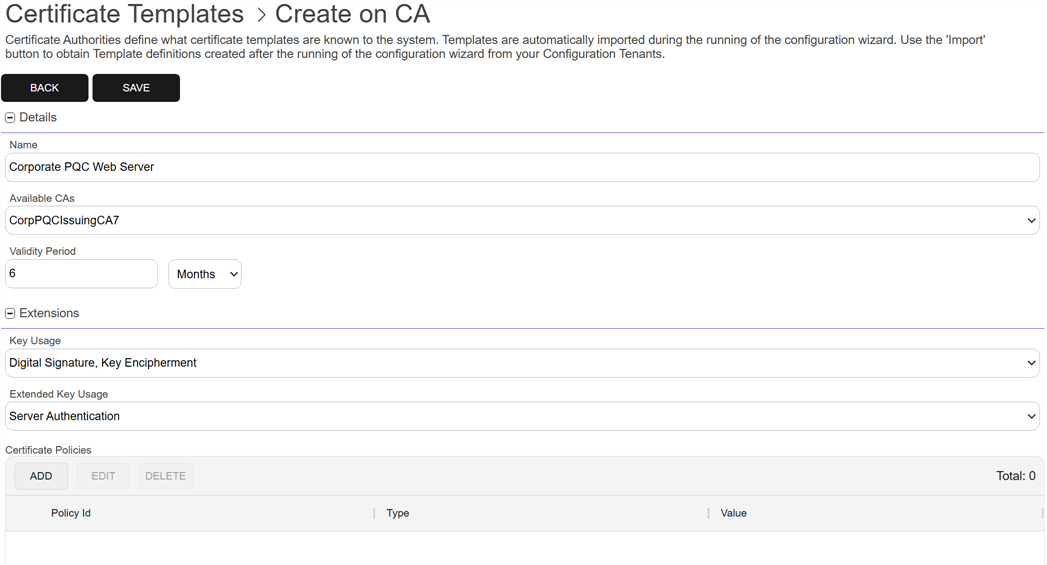
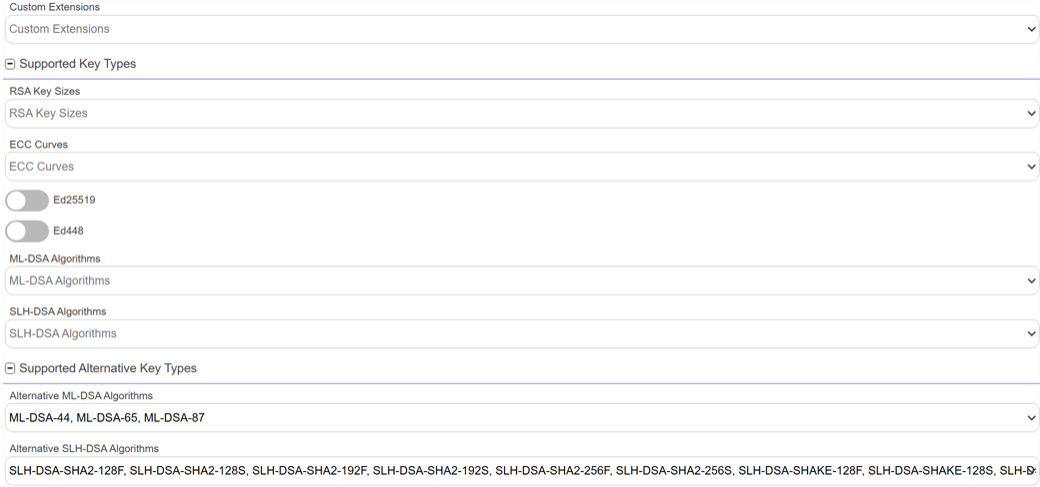
Figure 294: Templates: Create on CA
-
Default Settings
When Keyfactor Command creates or edits an EJBCA certificate profile and end entity profile, several settings are automatically configured and retained on future edits. These settings differ slightly depending on whether they’re always applied or applied only when a related object is included in the request.
Default Certificate Profile Settings
The following certificate profile settings are automatically configured when a template is created and remain unchanged on subsequent edits:
-
Version: 1
-
Type: End Entity
-
Signature Algorithm: Inherit from Issuing CA
-
Authority Information Access: Use
-
Use CA defined CA issuer (AIA
The authority information access (AIA) is included in a certificate--if configured--and identifies a location from which the chain certificates for that certificate may be retrieved.): Use -
CRL Distribution Points: Use
-
Use CA defined CRL Distribution Point: Use
-
Use CA defined OCSP locator: Use
-
LDAP DN order: Use
-
Subject Key ID: Use
Default Certificate Profile Settings When a Related Object Is Provided
These certificate profile settings are also configured and preserved, but only if a related object of that type is included in the request:
- Extended Key Usage: Use
- Certificate Policies: Use
-
Alternative Signature: Use
Default End Entity Profile Settings
These end entity profile settings are also configured by default:
-
Type: Default
-
Version: 1
-
Default Certificate Profile: The certificate profile being creating
-
Available Tokens: User Generated, P12
A PFX file (personal information exchange format), also known as a PKCS #12 archive, is a single, password-protected certificate archive that contains both the public and matching private key and, optionally, the certificate chain. It is a common format for Windows servers. File, BCFKS File, JKS A Java KeyStore (JKS) is a file containing security certificates with matching private keys. They are often used by Java-based applications for authentication and encryption. File, PEM A PEM format certificate file is a Base64-encoded certificate. Since it's presented in ASCII, you can open it in any text editor. PEM certificates always begin and end with entries like ---- BEGIN CERTIFICATE---- and ----END CERTIFICATE----. PEM certificates can contain a single certificate or a full certificate chain and may contain a private key. In general, extensions of .cer and .crt are certificate files with no private key, .key is a separate private key file, and .pem is both a certificate and private key. File -
Subject Alternative Name:
-
DNS
The Domain Name System is a service that translates names into IP addresses. Name (six preconfigured entries) -
IP Address
-
MS UPN, User Principal Name
-
RFC 822 Name (e-mail address)
-
MS GUID, Globally Unique Identifier
-
-
Default Token: User Generated
-
Default CA: The first available CA provided in template
View on CA
The fields available for viewing are the same as those available when creating or editing a CA (see Create or Edit on CA) but in a read-only state. Fields that do not apply to DCOM CAs will not be displayed for DCOM CAs (custom extensions, alternative keys types, and available CAs).
Copy on CA
The Copy on CA option creates a new template on an EJBCA instance by copying an existing template from either an EJBCA instance or a Microsoft CA configured in Keyfactor Command.
When you create a template in Keyfactor Command with the copy option, the system automatically creates a corresponding certificate profile and end entity profile—both named based on the new name of the template—in the associated EJBCA instance for the specified configuration tenant.
At least one CA from that EJBCA instance must be configured in Keyfactor Command before this option can be used. Templates cannot be created and linked to an existing end entity profile.
New templates are synchronized to the EJBCA instance immediately upon being saved.
To create a template as a copy of an existing template:
-
On the Certificate Templates page, select a template in the grid and choose Copy on CA from toolbar or right-click menu.
-
In the Select Configuration Tenant dialog, choose the configuration tenant for the EJBCA instance where you want to create the template.
Only configuration tenants for EJBCA instances accessed directly from Keyfactor Command are shown. Tenants for Microsoft CAs or EJBCA instances accessed through a gateway or CA connector are not included. The list is not limited by EJBCA version.
-
On the Copy on CA page, update the information copied from the original template as required and then click Save.
-
Name: A name for the template, which is used in EJBCA as both the certificate profile name and the end entity profile name.
-
Available CAs: In the dropdown, select one or more CAs—or check Select All. The selected CAs will be configured in the certificate profile and end entity profile as Available CAs.
-
Validity Period: Enter the validity period for certificates issued with this template.
-
Key Usage: In the dropdown, select one or more key usage values for certificates issued with this template.
-
Extended Key Usage: In the dropdown, select one or more extended key usage (EKU) values for certificates issued with this template. Use the filter to display only items whose names contain the typed text. The filter is case-sensitive.
Note: Only EKUs supported by Keyfactor Command (see Extended Key Usages) can be applied to templates for an EJBCA CA. Templates that include EKUs defined directly in EJBCA but not supported by Keyfactor Command can be viewed in Keyfactor Command, but they cannot be edited or saved. -
Certificate Policies: To add a certificate policy, click Add, and in the Certificate Policies dialog, enter the following information:
-
Policy Id: Specifies the unique Object Identifier (OID) that identifies the certificate policy. The OID links the certificate to a specific policy definition in your organization’s Certification Practice Statement (CPS) or internal PKI policy framework.
-
Type: Defines the type of information associated with the policy. The dropdown options are No Policy Qualifier (no additional data), User Notice Text (a short human-readable message), or CPS URI (a link to the applicable policy document).
-
Value: Specifies the content for the selected type. Enter the URI when the type is CPS URI, or the explanatory text or disclaimer when the type is User Notice Text. Leave this field empty when the type is No Policy Qualifier.
Figure 295: Add Certificate Policy During Create on CA
-
-
Custom Extensions: If any custom certificate extensions have been defined in your EJBCA instance, they will be available in this dropdown to be associated with the new template. Use the filter to display only items whose names contain the typed text. The filter is case-sensitive. See also View Extensions.
Tip: If two or must custom certificate extensions are configured in your EJBCA instance with the same name, only one of these will be displayed. Update the extension in EJBCA to give it a unique name to allow all extensions to appear in Keyfactor Command.Note: When retrieving custom extensions, Keyfactor Command assumes that each configuration tenant and host name combination (for example, https://ejbca.keyexample.com) is unique. If a configuration tenant in Keyfactor Command is associated with more than one host name, extensions are retrieved from the first host name found for the specified configuration tenant. - RSA Key Sizes: In the dropdown, select any RSA key sizes to associate with the template.
- ECC Curves: In the dropdown, select any ECC curves to associate with the template.
- Ed25519: Enable this option for the template, if desired.
- Ed448: Enable this option for the template, if desired.
- ML-DSA Algorithms: In the dropdown, select any ML-DSA algorithms to associate with the template.
- SLH-DSA Algorithms: In the dropdown, select any SLH-DSA algorithms to associate with the template.
- Alternative ML-DSA Algorithms: In the dropdown, select any ML-DSA algorithms to associate with the template as alternative keys.
- Alternative SLH-DSA Algorithms: In the dropdown, select any SLH-DSA algorithms to associate with the template as alternative keys.
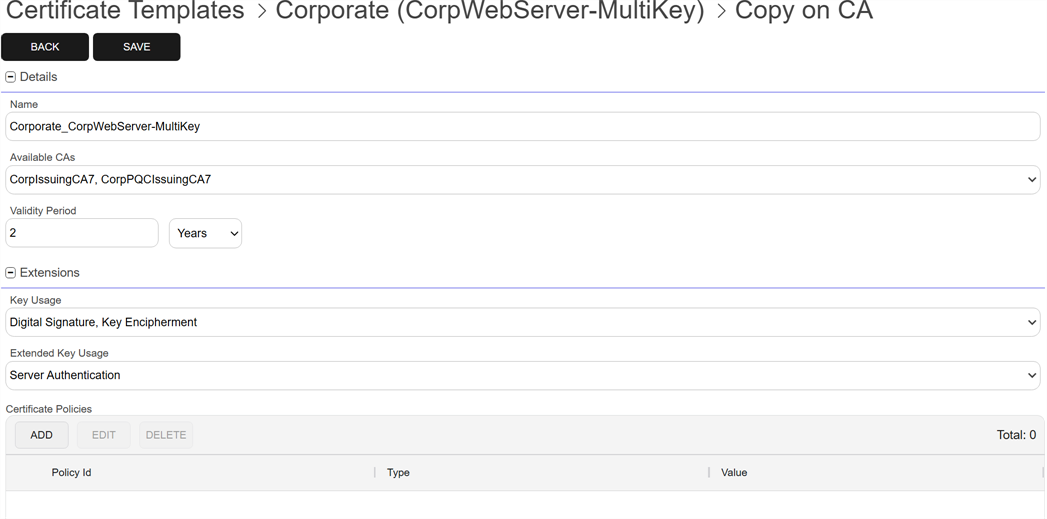
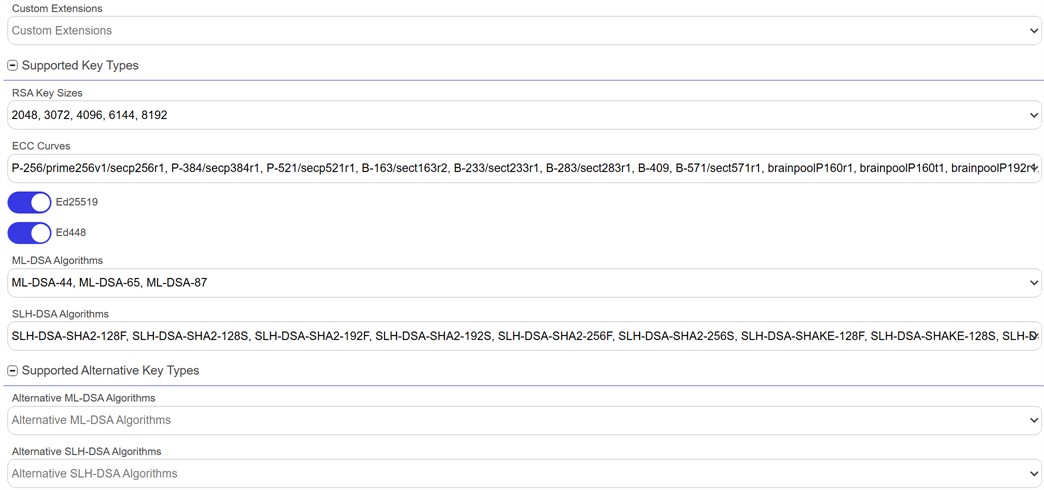
Figure 296: Templates: Copy on CA
-
Default Settings
When Keyfactor Command creates or edits an EJBCA certificate profile and end entity profile, several settings are automatically configured and retained on future edits. These settings differ slightly depending on whether they’re always applied or applied only when a related object is included in the request.
Default Certificate Profile Settings
The following certificate profile settings are automatically configured when a template is created and remain unchanged on subsequent edits:
-
Version: 1
-
Type: End Entity
-
Signature Algorithm: Inherit from Issuing CA
-
Authority Information Access: Use
-
Use CA defined CA issuer (AIA): Use
-
CRL Distribution Points: Use
-
Use CA defined CRL Distribution Point: Use
-
Use CA defined OCSP locator: Use
-
LDAP DN order: Use
-
Subject Key ID: Use
Default Certificate Profile Settings When a Related Object Is Provided
These certificate profile settings are also configured and preserved, but only if a related object of that type is included in the request:
- Extended Key Usage: Use
- Certificate Policies: Use
-
Alternative Signature: Use
Default End Entity Profile Settings
These end entity profile settings are also configured by default:
-
Type: Default
-
Version: 1
-
Default Certificate Profile: The certificate profile being creating
-
Available Tokens: User Generated, P12 File, BCFKS File, JKS File, PEM File
-
Subject Alternative Name:
-
DNS Name (six preconfigured entries)
-
IP Address
-
MS UPN, User Principal Name
-
RFC 822 Name (e-mail address)
-
MS GUID, Globally Unique Identifier
-
-
Subject DN Attributes: CN, O, OU, L ST, C, E, DC
-
Default Token: User Generated
-
Default CA: The first available CA provided in template
View Extensions
Custom certificate extensions are configured on an EJBCA instance to support a variety of custom needs. Within Keyfactor Command, they are sometimes used to support the use of custom SANs or a large number of SANs (see Appendix - Configuring Support for Large or Custom SANs with EJBCA) or for use with the Keyfactor Windows Enrollment Gateway. The View Extension option allows you to view or edit the custom certificate extensions configured on an EJBCA instance from within Keyfactor Command.
This function is based on a configuration tenant rather than an individual template.
To add a new custom extension or edit an existing one:
- On the Certificate Templates page, choose View Extension from the toolbar or right-click menu.
- Select the Configuration Tenant of the EJBCA instance you wish to manage.
- On the Custom Certificate Extensions page, click Add to add a new extension, or select an extension and click Edit.
-
Enter the following information:
-
Name: Give the extension a name for your reference. The name must be unique and cannot differ by case. For example, you cannot create one called My Extension and another called my extension.
-
OID: Enter a valid OID for the extension. The OID does not need to be unique between extensions.
-
Required: Click to enable the required option.
-
Critical: Click to enable the critical option.
-
- Click to Save the record. The extension will be synchronized to the EJBCA instance immediately.
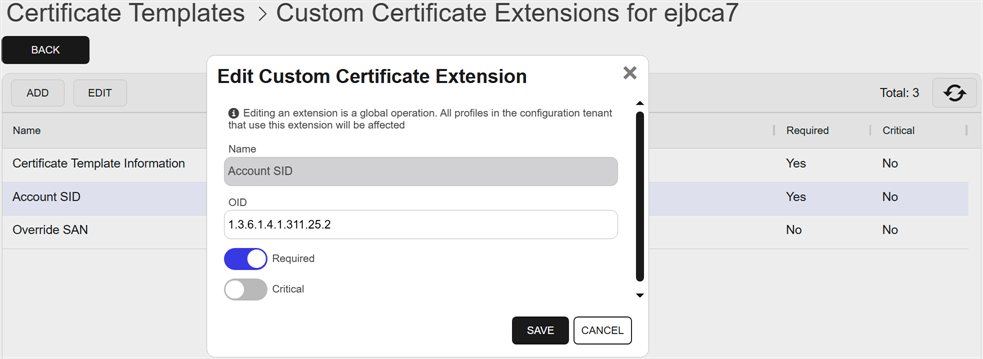
Figure 297: Edit Custom Certificate Template Extensions
- Extensions are created with encoding DEROBJECT.
- Extensions are created with an extension class of BasicCertificateExtension.
- Only extensions with an extension class of BasicCertificateExtension or BasicCVCCertificateExtension may be edited from Keyfactor Command. Editing extensions with extension class AuthorityKeyIdentifier or SubjectKeyIdentifier is not supported. The extension class cannot be changed from Keyfactor Command.
View Certificates
Permissions for certificates can be set at the system-wide or resource-specific level. The appropriate level depends on how the certificates are accessed. See Certificate Collection Permissions for more information.
To view the certificates in the Keyfactor Command database for a given template, select a template in the grid and choose View Certificates from the toolbar or right-click menu. This will take you to the certificate search page with the query field populated by the selected template (see Searching Certificates). You can save the search as a certificate collection at that point if desired (see Save Search Criteria as a Collection).